ADB and Fastboot Drivers Install very easy
Fastboot Drivers Install
1. Open it or Run as Administrator
2. Press Y/Yes to install ADB and Fastboot or N/No to skip
3. Press Y/Yes to install ADB system-wide or N/No for current user only
4. Press Y/Yes to install Drivers or N/No to skip
5. Continue Driver installation
6. 15 seconds passed - finished!
Symphony E82_HW1_V9 firmware without password
Symphony E82_HW1_V8 firmware without password
Symphony E82 Hang on logo done
Symphony E82 Frp remove Done Wth this firmware
E82_HW1_V8
Build Number: E82_HW1_V8
Android Version: v6.0 (Marshmallow)
Download Here
E82_HW1_V9
Build Number: E82_HW1_V9
Android Version: v6.0 (Marshmallow)
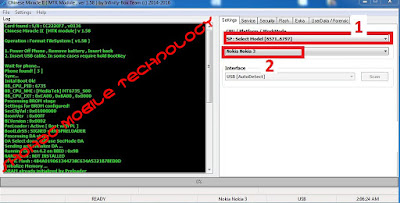
Nokia 3 FRP remove Done with CM2 just 1 click
Nokia 1 , Nokia 3 FRP remove done
First run CM2 Mtk Platform
If show [DA_ERROR] :
SECURITYBOOT_BOOT_NOT_ACCEPTED\
Just
need
\
Successes Report HERE
 |
Nokia 1 , Nokia 3 FRP remove done
|
shohag proyes
Mi Redmi Note 4 MTK CPU Dead boot repair Firmware
Redmi note 4 hang on logo done with this Firmware.
MI Redmi Note 4 Account remove instrument 100% working Tools :-
1. Need This Firmware
2. Need MRT Dongle
Other wise 100% remove not Possible
Flash with Latest SP tools or MRT Dongle
Redmi note 4 account remove procedures:-
How to Nokia 2 frp remove with z3x Box
Nokia 2 FRP Remove easy tips :
1. Go Vision Settings and Open TalkBack
2. Now Pull the whole display with fingers in this way
3. Go talkback Settings
4. Now click help and feedback
5. Click About Switch to access
6 . Then Show you tube video and play this video now click video link
7. address bar write www.google.com
More Details Here
Samsung S7 EDGE Copy 100% Tested Firmware
MT6580__samsung__SM-G9350__hero2qltechn__6.0.1__ALPS.L1.MP6.V2.19_HCT6580.WEG.A.L_P55
V: MT6580__samsung__SM-G9350__hero2qltechn__6.0.1__ALPS.L1.MP6.V2.19_HCT6580.WEG.A.L_P55
Attention Please : Paid File not free.
MT6572__iris505__iris505__iris505__4.4.2__ALPS.KK1.MP7.V1
Lava 505 Hang on logo problem Solve
Lava 505 LCD Blank, Camera Problem Solve
Note: Please make a backup of your Lava Iris 505 device (phone) before installing / updating ROM / Format / Rooting.
Attention Please : Paid File not free. Because I Buy this file
Lava 505 Hang on logo problem Solve
Lava 505 LCD Blank, Camera Problem Solve
Please check builder number version then flash
Attention Please : Paid File not free. Because I Buy this file
Download
Lava 505 GP_S104 Hang on logo problem Solve
Lava 505 LCD Blank, Camera Problem Solve
Attention Please : Paid File not free. Because I Buy this file
Samsung J710 Root File
Samsung J710GN 6.0.1 Root File
Operation: Unlock
Selected model: SM-J710GN
Software version: 27.6
Waiting ADB device... Ok
Reading phone info...
Model: SM-J710GN
Android version: 6.0.1
Product code: SM-J710GZDUXME
Phone version: J710GNDXU1API1
PDA version: J710GNDXU1API5
CSC version: J710GNOLB1API2
CSC country code: MALAYSIA
CSC sales code: XME
HW version: MP 0.400
Phone SN: RF8HB1YTZHT
Chip name: EXYNOS7870
Modem board: SHANNON315
RF cal date: 20161116
IMEI:
Checking Super user right... true
Reading NV data... Ok
Checking NV data... Ok
Initialization zTool... Ok
Running zTool, please wait...
Start... Ok
Initialization... Ok
Generate and check client proof... Ok
Verify proof by client... Ok
Reading data from phone... Ok
Modem board: SHANNON315
HWID: 35 07 00 00 00 00 00 00 00 00 00 00 5E 88 A2 C1
Calculating... Ok
Unlocking... Ok
Writing NV data... Ok
Rebooting phone... Ok
Unlock done
Done with Samsung Tool PRO v.27.6
Samsung G925F (S6 EDGE) IMEI , Unknown Baseband Repair Done
Samsung G925F (S6 EDGE) IMEI , Unknown Baseband Repair Done With Z3X Box
*Note : My Phone Problem Emergency Call and IMEI 350000000000000
First need Root
Then Repair network But Failed
.........................
Reading nv data... OK
Checking NV data... error
Security damaged (1)
Repair IMEI But Failed
Checking Super user right... true
Initializating zTool... OK
Running zTool, please wait...
Start... OK
Init... OK
Generate and check client proof... OK
Verify proof by client... OK
Reading data... OK
Checking certificate file... OK
KEY ID: 0346
Reading nv data... OK
Checking NV data... error
Security damaged (1)
Then show IMEI And Baseband Null
Then IMEI 000000000000000 And Baseband ok
Then Repair Imei
Waiting ADB device... Ok
Reading phone info...
Model: SM-G925F
Android version: 6.0.1
Product code: SM-G920FZKAXXV
Phone version: G925FXXU4BPF1
PDA version: G925FXXU4DPH1
CSC version: G925FOLB4DPH1
CSC country code: VIETNAM
CSC sales code: XXV
HW version: MP 0.800
Phone SN: RF1D45EJGGR
Chip name: EXYNOS7420
Modem board: SHANNON333
RF cal date: 20150406
IMEI:
Checking Super user right... true
Reading NV data... Ok
Checking NV data... Ok
Initialization zTool... Ok
Running zTool, please wait... Ok
HWID: 88 FC B7 75 0D 04 00 00 00 00 00 00 00 00 00 00
Calculating... Ok
Repairing... Ok
Writing NV data... Ok
Rebooting phone... Ok
Repair done
Then Unlock
and
Emergency Call Repair
Waiting ADB device... Ok
Reading phone info...
Model: SM-G925F
Android version: 6.0.1
Product code: SM-G920FZKAXXV
Phone version: G925FXXU4BPF1
PDA version: G925FXXU4DPH1
CSC version: G925FOLB4DPH1
CSC country code: VIETNAM
CSC sales code: XXV
HW version: MP 0.800
Phone SN: RF1D45EJGGR
Chip name: EXYNOS7420
Modem board: SHANNON333
RF cal date: 20150406
IMEI:
Checking Super user right... true
Initialization zTool... Ok
Running zTool, please wait... Ok
Reading modem... Ok
Patching modem... Ok
Writing modem... Ok
Rebooting phone... Ok
Patching CERT check... done
Done with Samsung Tool PRO v.27.6
All Samsung New Security FRP Remove Software Free Download
Samsung FRP Bypass 100% done risk free solution Just Need Tow Software
Any Problem please Comments .. Our Comments Box
Stay With us For New Update and New Hot news
Please Share Our Page
Same instruction :
First need Samsung account or Facebook Account
1. Install SideSync software
2.Connect the phone to wifi
3. Open SideSync software
4. and connect phone with usb cable and copy Unlock software
5. then show apps store click apps store
6. update apps store and sign in
7. Download ES File Explorer File Manager
8. Install Samsung New Security FRP Remove Software
9. and open This Software .. and go google acc: and sign in new Gmail account
then done ..........
Reactivation lock / Samsung Account :
---------------------------------------------------
Reactivation
lock lets you use your Samsung account to prevent others from
activating your device if it's ever lost or stolen. With Reactivation
lock turned on, you will be required to enter your Samsung account
credentials prior to performing a factory reset on the device, so your
Samsung account login should be something you can easily remember.
This feature is not the same as Device lock, which is the password, PIN,
or other method used to unlock your device when it has been turned off
or inactive.
FRP Lock (Factory Reset Protection)/ Google Account :
-------------------------------------------------------------------
Android
Factory Reset Protection (FRP) is a new feature to protect your device
which has been added to several Samsung devices that are running
Android OS 5.1 or higher.
This feature allows you to set up your device to prevent other people
from using it if it's been reset to factory settings without your
permission. For example, if your device is lost, stolen, flashed, or
wiped, only someone with your Google account or screen lock information
can perform a factory data reset and use the device.
When a device is factory reset, the device will not be able to be
setup without the user entering the Google Account associated with the
device (for hard reset) or screen lock information (for reset in
Settings menu).
Important! You must set up a Google account
in order to utilize the FRP feature. It is highly recommended that you
set a secure screen lock on your device.
What Is The Solution ... ?
++++++++++++++++++
FRP Lock / Google Account Solution : (READ HERE)
-----------------------------------------------------------------------
Reactivation lock / Samsung Account Solution Below  Or (READ HERE)
Let's me explain my simple method
 For Samsung account, You need to find a track for access to Samsung
Apps or browser . You can get the track to help option Or keyboard
setting (It's you can open from keyboard) ETC Other Way. After get the
track you need try a comment to Samsung Apps store site ( Down the any
apps ) and u will see login tab. Just login and do a comments after
that come back to main menu and login with that id Which you used last
time for the commends .In case it's unable to login just Hard Reset
Your phone and once again try. All the android are same But for Samsung
u need to commends to Samsung Apps. Simple it
What Does I mean by Track ?Example : SAMSUNG KEYBORD SETTING - PREDICTIVE TEXT Its a track to access Browser :P
 For Browser :
After get browser entry the link (
Samsung ) and login other all are same
Code:
http://www.samsung.com/us/support/account/
The Track Depend on Phone and version all are not same . You need find by your self. Don't asked for it
I have tested to many Samsung mobile Even Lollipop I used this method since Starting this problem
Its Will help you if you findout the Track by your self Otherwise Sorry  Maybe its old history for all Of you . But I shared for the new guy
[Big News] Bypass Samsung Account / Reactivation Lock (No-Otg) Android 5.1.1
Original Post
GSM Hosting
What's FRP ?
Reactivation Lock mean's Samsung Account Lock
You can solve with too many ways all available in forum. Also you can follow my method
FRP Lock unlock Software also work for Samsung account If you have you can do in few sec :P
-----------------------------------------------------------------------------------------------
FRP Lock mean's Google Account Lock
What's FRP ? FRP Mean's
Factory Reset Protection
Samsung account
method work on
FRP Lock ( Google lock ) if android version 5.0.1 (
Only). Its tested by ( Friend ). And for 5.1.1 solutions available ( Its private yet ) But the solution works confirmed
By my beloved friends
shohag proyes
Mi note Hang on logo Done
Redmi-Note- Flash File
Redmi Note- Mi Note Same Model Same Flash File
MI Model-2013121 Flash file
 Download this package + Driver
- Unpack
- run flash_tool.exe
- load MT6592_Android_scatter.txt
- Select
DOWNLOAD ONLY and NEVER set FORMAT..!!!
- Plug in you device without battery to the PC
- Press DOWNLOAD
- Done
Code:
Open serial port...OK
Connecting to the RIFF Box...OK
Firmware Version: 1.37, JTAG Manager Version: 1.55
Selected Resurrector: [Samsung S7562 V1.0.4816.57076]

Connecting to the dead body...OK
Detected dead body ID: 0x106230E1 - CORRECT!
Set I/O Voltage reads as 2.61V, TCK Frequency is RTCK
Adaptive Clocking RTCK Sampling is: [Sample at MAX]
Settings Code: 0x20010000000000000000000020000000

Resurrection sequence started.
Establish communication with the phone...OK
Initializing internal hardware configuration...OK
Uploading resurrector data into memory...OK
Starting communication with resurrector...OK

Detected an Initialized FLASH1 Chip, ID: 0x0015/0x0100 (A00SJJ, 0x0000E9000000 Bytes = 3.64 GB)
Detected an Initialized FLASH2 Chip, ID: 0x0015/0x0100 (A00SJJ, 0x000000100000 Bytes = 1.00 MB)

Writting FLASH1 memory from 0x000000000000 to 0x00001FFFFFFF
Completed in 01:58:09.875 (Average Transfer Rate: 73.95 kB/s)


MIRACLE BOX
Truly for China Mobile
Released 2.18
13th Sept 2015
[Miracle key Edition]
What New in Update:
👊 1.PD Add SC8830/7731/7715 Read/Write Support . 👍
👊 2.SPD Add SC8830 EMMC Format/IMEI NV Read/Write Support/Read Pattern. 👍
👊 3.SPD Add SC8830/7730/31 EMMC Read Phone Book. 👍
👊 4.SPD Add SC7715 Nand Read Pattern (Read Unlock) and Phone Book. 👍
👊 5.MTK Add MT6753/6735/6582/6595 etc. EMMC Read Phonebook.
👊 6.MTK Add MT6572/71 Nand Read Pattern and Phonebook .
👊 7.MTK Improve Android Read Flash (Faster Then Before).
👊 8.Add MI/Xiomi Mobile (Qualcomm) IMEI Repair (Qualcomm). 👍
👊 9.Improve software Connect and Fix some Bugs.
👊 10. Server Speed Improved.
{WORLD'S FIRST ALWAYS} {Info About Miracle Key Dongle} NO NEED CREDIT | NO NEED ACTIVATION | NO NEED INTERNET ALWAYS WE ALWAYS CARE OUR USER 4 YEAR CONTINUES FREE UPDATE (:::::::::::::::::[FEEL THE POWER OF]:::::::::::::::::) (:::::::::::::::::[MIRACLE TEAM]:::::::::::::::::)

Reactivation lock / Samsung Account :
---------------------------------------------------
Reactivation lock lets you use your Samsung account
to prevent others from activating your device if it's ever lost or
stolen. With Reactivation lock turned on, you will be required to enter
your Samsung account credentials prior to performing a factory reset on the device, so your Samsung account login should be something you can easily remember.
This feature is not the same as Device lock, which is the password, PIN,
or other method used to unlock your device when it has been turned off
or inactive.
FRP Lock (Factory Reset Protection)/ Google Account :
-------------------------------------------------------------------
Android Factory Reset Protection (FRP) is a new feature to protect your device which has been added to several
Samsung devices that are running Android OS 5.1 or higher.
This feature allows you to set up your device to prevent other people
from using it if it's been reset to factory settings without your
permission. For example, if your device is lost, stolen, flashed, or
wiped, only someone with your Google
account or screen lock information can perform a factory data reset and use the device.
When a device is factory reset, the device will not be able to be setup without the user entering the Google
Account associated with the device (for hard reset) or screen lock information (for reset in Settings menu).
Important! You must set up a Google
account in order to utilize the FRP feature. It is highly recommended that you set a secure screen lock on your device.
What Is The Solution ... ?
++++++++++++++++++
FRP Lock / Google Account Solution : (READ HERE)
-----------------------------------------------------------------------
Reactivation lock / Samsung Account Solution Below Or (READ HERE) Let's me explain my simple method For Samsung account, You need to find a track for access to Samsung
Apps or browser . You can get the track to help option Or keyboard
setting (It's you can open from keyboard) ETC Other Way. After get the
track you need try a comment to Samsung
Apps store site ( Down the any apps ) and u will see login tab. Just
login and do a comments after that come back to main menu and login
with that id Which you used last time for the commends .In case it's
unable to login just Hard Reset Your phone and once again try. All the
android are same But for Samsung u need to commends to Samsung Apps. Simple it For Browser : After get browser entry the link (
Samsung ) and login other all are same
Code:
http://www.samsung.com/us/support/account/
The Track Depend on Phone and version all are not same . You need find by your self. Don't asked for it I have tested to many Samsung mobile Even Lollipop I used this method since Starting this problem Its Will help you if you findout the Track by your self Otherwise Sorry Maybe its old history for all Of you . But I shared for the new guy
Samsung account & reactivation lock remove software free
Bypass any Samsung Google verify account
a lot of user having this issue.
this is looks like

this software just for update like 5.1.1 upper version work.
this day the software become a business
that's why i m here to share the paid software
Download Here
Pass: http://rayerbazarmobile.blogspot.com
what you need?
1.my software
2.otg cable
3.same as same issue phone
note that the software unable to bypass samsung account.
don't ask me for that.it is just for bypass google verification.because i clear everything here.
how to use?
- 1.simple brain
- 2.put the file on pendrive
- 3.power on phone
- 4.connect the pendrive through otg cable
- 5.now you will see file manager
- 6.install the software
- 7.then you will automatic promoted to settings
- 8. make reset from settings
- 9.wait to restart phone
- 10.now setup as new phone


