Rayerbazar Mobile: iPhone information
Rayerbazar Mobile Apps For Android Phone
Rayerbazar Mobile Any Password Protected File Post... Go This Link For Password and Search Dont Mind Friend
.::Shohag Mobile Technology::. Rayerbazar, Dhaka-1209. All Kinds OF Mobile Solution HERE....... iPhone, Samsung, Nokia, Blackberry, LG Flash & Unlock Email-shohag.proyes@yahoo.com Mobile No.+8801618405155
Attention Please:


"
All My Sweet Friends When any File download Please Read Full Information then Download File ( All Flash File Full Free No Need Cost "Thanks" )

Showing posts with label iPhone information. Show all posts

28 January 2015

Apple iPhone iOS 8.1.3 Releases

           Apple Releases iOS 8.1.3          


8.1.3 (4S): iPhone4,1_8.1.3_12B466_Restore.ipsw
8.1.3 (5 GSM): iPhone5,1_8.1.3_12B466_Restore.ipsw
8.1.3 (5 GSM+CDMA): iPhone5,2_8.1.3_12B466_Restore.ipsw
8.1.3 (5c GSM): iPhone5,3_8.1.3_12B466_Restore.ipsw
8.1.3 (5c GSM+CDMA): iPhone5,4_8.1.3_12B466_Restore.ipsw
8.1.3 (5s GSM): iPhone6,1_8.1.3_12B466_Restore.ipsw
8.1.3 (5s GSM+CDMA): iPhone6,2_8.1.3_12B466_Restore.ipsw
8.1.3 (6+): iPhone7,1_8.1.3_12B466_Restore.ipsw
8.1.3 (6): iPhone7,2_8.1.3_12B466_Restore.ipsw
__________________________________________________ ____
8.1.3 (iPad 2 Wi-Fi): iPad2,1_8.1.3_12B466_Restore.ipsw
8.1.3 (iPad 2 GSM): iPad2,2_8.1.3_12B466_Restore.ipsw
8.1.3 (iPad 2 CDMA): iPad2,3_8.1.3_12B466_Restore.ipsw
8.1.3 (iPad 2 New): iPad2,4_8.1.3_12B466_Restore.ipsw
8.1.3 (iPad Mini Wi-Fi): iPad2,5_8.1.3_12B466_Restore.ipsw
8.1.3 (iPad Mini GSM): iPad2,6_8.1.3_12B466_Restore.ipsw
8.1.3 (iPad Mini CDMA): iPad2,7_8.1.3_12B466_Restore.ipsw
8.1.3 (iPad 3 Wi-Fi): iPad3,1_8.1.3_12B466_Restore.ipsw
8.1.3 (iPad 3 CDMA): iPad3,2_8.1.3_12B466_Restore.ipsw
8.1.3 (iPad 3 GSM): iPad3,3_8.1.3_12B466_Restore.ipsw
8.1.3 (iPad 4 Wi-Fi): iPad3,4_8.1.3_12B466_Restore.ipsw
8.1.3 (iPad 4 GSM): iPad3,5_8.1.3_12B466_Restore.ipsw
8.1.3 (iPad 4 GSM+CDMA): iPad3,6_8.1.3_12B466_Restore.ipsw
8.1.3 (iPad Air Wi-Fi): iPad4,1_8.1.3_12B466_Restore.ipsw
8.1.3 (iPad Air Cellular): iPad4,2_8.1.3_12B466_Restore.ipsw
8.1.3 (iPad Air China): iPad4,3_8.1.3_12B466_Restore.ipsw
8.1.3 (iPad Mini 2 Wi-Fi): iPad4,4_8.1.3_12B466_Restore.ipsw
8.1.3 (iPad Mini 2 Cellular): iPad4,5_8.1.3_12B466_Restore.ipsw
8.1.3 (iPad Mini 2 China): iPad4,6_8.1.3_12B466_Restore.ipsw
8.1.3 (iPad Mini 3 Wi-Fi): iPad4,7_8.1.3_12B466_Restore.ipsw
8.1.3 (iPad Mini 3 Cellular): iPad4,8_8.1.3_12B466_Restore.ipsw
8.1.3 (iPad Mini 3 China): iPad4,9_8.1.3_12B466_Restore.ipsw
8.1.3 (iPad Air 2 Wi-Fi): iPad5,3_8.1.3_12B466_Restore.ipsw
8.1.3 (iPad Air 2 Cellular): iPad5,4_8.1.3_12B466_Restore.ipsw
________________________________________________
8.1.3 (5G): iPod5,1_8.1.3_12B466_Restore.ipsw

26 December 2014

iPhone4 FREE iCloud Unlocker (with Video tutorial)


FREE iCloud Unlocker for iPhone4 (with Video tutorial)


Video


Only for iPhone4 ver 7.0 until 7.1.1

Download Now

Mediafire Link


04 December 2014

Why Cydia Is Called as "Cydia"?


Cydia is a household name amongst the jailbreak community, but what does the word really mean? and why was it called that? Those of you who have jailbroken iOS devices are very likely to have used Cydia. The credit for this store which brings extra unrestricted functionality to our iOS devices goes to Jay “saurik” Freeman, who happens to be the brains behind this concept.

Cydia is used by millions of iPhone users and may be a very well known application, but not many people know what it means. Cydia is interestingly enough, named after a moth of all things! The Cydia pomonella to be precise, is the scientific name for the “coddling moth” or what is more commonly known as the stereotypical Apple worm

  According to Wikipedia, the Cydia pomonella “has proved to be a problematic pest on several fruit trees, including apples and pears. The caterpillars burrow into the fruit, rendering it un-sellable”. The ironic name of Cydia is therefore fitting, since it has turned out to be quite the worm to Apple’s devices. With each successive iOS release, the term “jailbreak” is becoming more prevalent amongst the average user and that can only be a good thing for development of the replacement packaging and repository manager.

So now you know, the vital tool for your iOS devices jailbreak is named after a moth that is a pest for fruit trees, such as those of apples (fruit) and Apple Inc

jailbreak of iOS 8.1.1 and iOS 8.2beta


A jailbreak of iOS 8.1.1 and iOS 8.2 beta has just been released by TaiG.

MuscleNerd confirmed the jailbreak over Twitter; however, he warns that you should probably wait a couple days before attempting.

Looks like TaiG just released a jailbreak for 8.1.1 (and 8.0,8.1,8.2beta). Best to wait a few days just in case

TaiG was part of the controversial iOS 7 jailbreak from the Evad3rs. The jaibreak included the TaiG 'app store' for cracked apps by default in China. Following an outcry from the community the evad3rs responded by updating their jailbreak tool to remove TaiG. They also posted a letter to the community saying "we are deeply sorry and embarrassed about the piracy that was seen today".

It's unclear what comes bundled with the TaiG jailbreak that has just been released. We are looking into it and will update this article shortly. It's also unclear as to who is actually behind the exploits used for the jailbreak.


or

18 July 2014

LG Downloader & Iphone IPSW Downloader in ONE By sl3cluster team

A small gift from boykaunlock and sl3cluster team


15 July 2014

Install Android on iPhone 3G/2G using Windows iPhoDroid R13h

How to install Android on iPhone 3G/2G using Windows iPhoDroid R13h


iPhoDroid supported Windows but for iPhone 3G only, today, it brings support for iPhone 2G too. With iPhodroid R13k you can install Android on iPhone 3G and iPhone 2G on Windows or Mac OS X thanks to
Sergio Mclfy, the developer behind iPhoDroid.


Note:
Your iPhone 3G, 2G must be jailbroken, you can use Redsn0w to jailbreak iPhone 3G, 2G on any firmware (including iOS 4.0.2) except iOS 4.1, or wait for a public jailbreak for iOS 4.1.

Step 1: Download iPhoDroid R13k at the bottom of the page
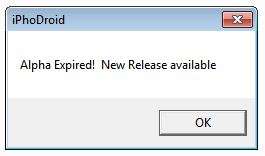
Step 2: When launching the application on Windows 7 you may have a strange error says "Apha Expired! New Release available", it can be solved by changing the date a month back (i.e. if the date of the system is Sep. 13 then change it to Aug. 13)


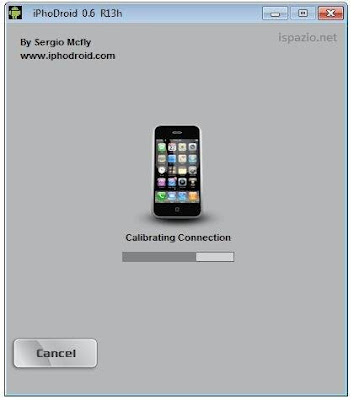
Step 3: Connect your iPhone to your PC / Mac via USB and launch iPhodroid


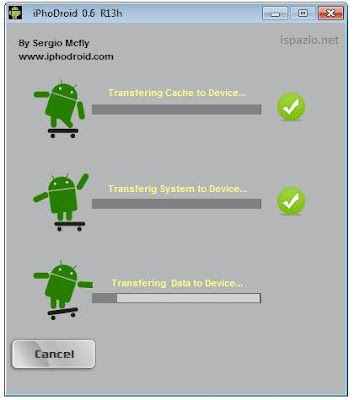
Step 4: Now, hit the "Shot" button to begin the process, after a bunch of processes, your iPhone will be rebooted and enter recovery mode.


Step 5: Launch iPhoDroid again and hit "Exit Recovery Mode" to start your iPhone.

Horaya! Now, you have an iPhone 3G / 2G unlocked on Android Froyo 2.2, iPhoDroid R13k can be downloaded from the links below:

Download iPhodroid R13k for iPhone 3G (Windows)
Download
iPhodroid R13k for iPhone 2G (Windows)

07 July 2014

13 June 2014

iPhone 4 iOS 7.1.1 iCloud Lock Bypass Solution 1000% Tested By Shohag Gsm

How To Bypass iOS 7.1.1 Apple ID Activation Lock + Jialbreak Semi Untethered iCloud [iPhone 4] 
Bypass iOS 7.1.1 Apple ID Activation Lock
 iPhone 4 Bypass iOS 7.1.1 Apple ID Activation Lock
Apple ID Activation  iOS 7.1.1 iPhone 4
 
How To Bypass iOS 7.1.1 Apple ID Activation Lock + Jialbreak Semi Untethered iCloud [iPhone 4] - See more at: http://www.hackurideviceblog.com/2014/05/how-to-bypass-ios-711-apple-id.html#sthash.wTBTUwz9.dpuf


·  Download and install,  NetFrameWork,  Java JRE 7, and Java JDK Tool x86 (32 Bit) , even if you have a 64 Bit computer (that's only if you don't have them installed already.)
·  Download   GeekSn0w v2.9, (wait 5 seconds and click skip ad at the upper right hand corner.)
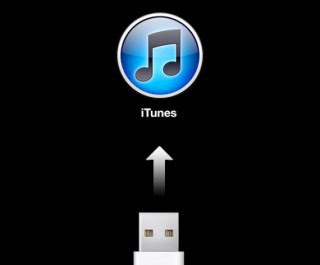
·   Open GeekSn0w and Click Jailbreak, choose your device model, and put your device in DFU mode
·  Now click jailbreak once again.
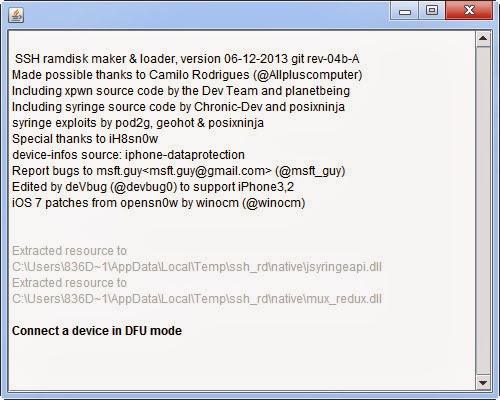
·  Wait until ssh_rd tool is done (when you see Successful in GREEN letters)
·  Your device will reboot and look like its in restore mode.
·  Give it some time to mount the system files and upload the Jailbreak Data.
·  Once its done you you'll see your device in recovery mode
·  Wait till GeekSn0w prompts you to put your device into DFU mode and wait will it boots up with OpenSn0w (this will take some time, be patient)
·  You'll see what must people call the "Matrix Screen" 
·  Now put your device into DFU mode once again.
·  This time when your device turns on, scroll to the side, and you'll see Cydia!
·  You'll need to let the Cydia's file system prepare twice before Cydia can function correctly.
·  Enjoy!!

iPhone 4 iCloud Lock bypass "No Service" Solution Here

- Download ssh_rd_rev04b ( https://sites.google.com/site/msftgu..._rd_rev04b.jar )
- Run it then put your iDevice in DFU mode .
- Download and run WinSCP ( Downloading winscp553.zip :: WinSCP ) , connect to your iPhone ( hostname : 127.0.0.1 / login : root / password : alpine / port 2022 )
- WinSCP / Command / Terminal : mount.sh
- Navigate to /mnt1/Applications/ , remove Setup.app
- Terminal : halt
- Power on device , download TinyUmbrella ( http://cache.firmwareumbrella.com/do...la-7.11.00.exe ) , Recovery Devices / Exit Recovery .

24 April 2014

Jailbreak iOS 7.1 Beta 3 Jailbreak With Evasi0n7


Jailbreak iOS 7.1 beta 3 has been released. This Jailbreak compatible with iOS 7.1 beta, but do it on a device with iOS 7.1 beta is not recommended! You may experience serious bugs and if you have not encountered them , it does not mean that they are not. Also tweaks that use MobileSubstrate does not work properly at the current time .

WARNING ! Jailbreak should be done only after the upgrade to iOS 7.0.4, do not put it , if you are upgrading on OTA . Reflash the device and then use our instructions .

Utility for iOS Jailbreak iOS 7.1 Beta 3 / iOS 7.0.4 supports the following devices :
  • iPhone 5s
  • iPhone 5c
  • iPhone 5
  • iPhone 4S
  • iPhone 4
  • iPad 2
  • iPad 3
  • iPad 4
  • iPad Air
  • iPad mini
  • iPad mini 2 Retina
  • iPod touch 5

Download Jailbreak iOS 7.1 and 7.x.x

18 April 2014

iPhone4 all Tools here


iTools.7z iTools.7z
Size : 3008.346 Kb
Type : 7z
ifunbox download.7z ifunbox download.7z
Size : 6008.683 Kb
Type : 7z
iExplorer.7z iExplorer.7z
Size : 9421.211 Kb
Type : 7z
iPhone Serial Number Checker.rar iPhone Serial Number Checker.rar
Size : 4.415 Kb
Type : rar
ifaith-v1.5.9.zip ifaith-v1.5.9.zip
Size : 4867.603 Kb
Type : zip
f0recast-v1.4.2_win.zip f0recast-v1.4.2_win.zip
Size : 57.28 Kb
Type : zip

17 April 2014

iPhone 3G 3GS Ultrasn0w Unlock file By shohag gsm

baseband 06.15.00 Support  100%okay work

iphone 3gs 6.1.3  without wifi  unlock file.rar iphone 3gs 6.1.3 without wifi unlock file.rar
Size : 120.542 Kb
Type : rar
iTools.7z iTools.7z
Size : 3008.346 Kb
Type : 7z
  Any other baseband besides these will NOT work for the ultrasn0w unlock.

 iphone 3gs 6.1.6 jailbreak unlock susesfull

3gs iPhone2,1_6.1.6_10B500_Res
tore untethered jailbreak & unlock

1) Restore your device with iPhone2,1_6.1.6_10B500
2) Jailbreak
2.1) Open redsn0w_win_0.9.15b3
2.2) Go to extra
2.3) Go to select ipsw
2.4) Select iPhone2,1_6.0_10A403_Restore
2.5) Back
2.6) Jailbreak
2.7) Next, follow the instructions to enter dfu mode
2.8) Check install cydia & install ipad baseband
2.9) Wait until jailbreak done

3) There will be no cydia in your device
3.1) Open redsn0w_win_0.9.15b3
3.2) Go to extra
3.3) Go to select ipsw
3.4) Select iPhone2,1_6.0_10A403_Restore
3.5) Go To Just boot
3.6) Follow the instructions to enter dfu mode
4) after device on u can see cydia
5) Open Cydia.
6) Click the "Changes" tab in the footer.
7) Press the "Refresh" button in the top left corner.
8) After "Reloading Data", perform a search for "p0sixspwn" (the O is a zero).
9) Tap Install.
10) After installing p0sixspwn your device is untethered
11) Install ultrasnow 1.2.8

icloud bypass 7.1-7.0.6 Tools Download Here

icloud bypass 7.1-7.0.6  Download
SSH_ RD_Hacktivate_Tool.rar SSH_ RD_Hacktivate_Tool.rar
Size : 7337.517 Kb
Type : rar
GW_iCloud_Bypass.zip GW_iCloud_Bypass.zip
Size : 12311.424 Kb
Type : zip
Short Tutorial : I n the mean time here is a quick written tutorial.
Put device into DFU mode
Run ssh.jar wait until it says successful
Open winSCP
Open a new connection
Host name: 127.0.0.1
Port: 2022
Login: root
Pa ssword: alpine
Press the terminal button in winSCP and type: mount.sh
Go to /mnt1/var/Applications and right click and delete setup...

bypass.zip bypass.zip
Size : 9767.729 Kb
Type : zip
iPhone4_Hacktivate_Tool.rar iPhone4_Hacktivate_Tool.rar
Size : 8083.844 Kb
Type : rar
How to use

1) Download and install the utility iPhone4_Hacktivate_Tool

2) Open iPhone4_Hacktivate_Tool

3) Put your iphone4 into DFU mode

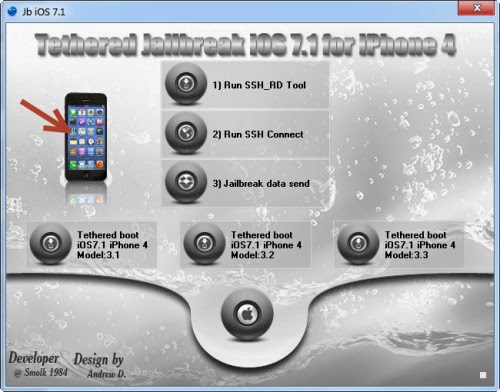
4) Press Button 1 to run the ssh_rd tool

5) Wait until ssh_rd tool is done

6) Run number 2 to mount your devices filesystem

7) Now run number 3 to copy the needed files over to hacktivate your iphone 4

8) Your device will reboot and go into restore mode

9) Press the exit recovery button
 
other support tool
iOS Soft Dev Pack.rar iOS Soft Dev Pack.rar
Size : 9743.014 Kb
Type : rar
 
 
other support tool
Short Tutorial :
I n the mean time here is a quick written tutorial.
Put device into DFU mode
Run ssh.jar wait until it says successful
Open winSCP
Open a new connection
Host name: 127.0.0.1
Port: 2022
Login: root
Pa ssword: alpine
Press the terminal button in winSCP and type: mount.sh
Go to /mnt1/var/Applications and right click and delete setup...
JailSn0w.rar JailSn0w.rar
Size : 6598.246 Kb
Type : rar

25 March 2014

iTunes 11.1.5 !


Today Apple release new iTunes 11.1.5 !

for Windows XP, Vista or Windows 7


Quote:
https://secure-appldnld.apple.com/iT...TunesSetup.e

24 March 2014

Bypass iOS 7.1 Activation Lock & Jailbreak iOS 7.1 here

Smolk, a Russian developer, has a found a workaround for the remote iCloud activation lock function for devices running iOS 7.1, 7.0.6, 7.0.4, 7.0.3 and below.
He lately presented a new program will not only allow enables him around the iCloud activation lock, but also jailbreak iOS 7.1. The process is only for iPhone 4, but certain conditions have to be met.
For example, the phone has to be renamed through iTunes as a 'new device' and the password has to be disabled. Then bypass iOS 7 activation lock process has to be executed before the jailbreak is performed.
IOS 7.1 Bypass iCloud

Guide to jailbreak iOS 7.1 along with iOS 7 activation lock bypass

Step 1: Make a download from the link for jailbreaking iOS 7.1. The file works with Windows XP as well as Windows 7 and 8.
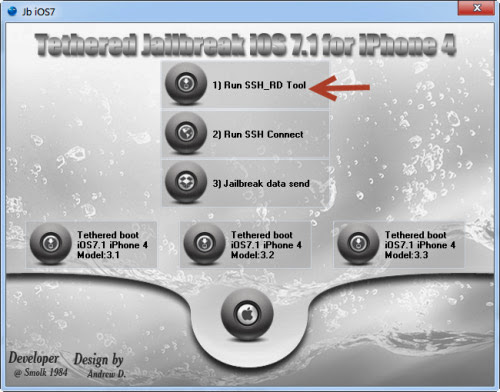
Step 2: Now connect your iPhone 4 to the computer, launch the program and selected 'tethered jailbreak iOS 7 for iPhone 4'.
Step 3: Now click the button that says '1) Run SSH_RD Tool'.
bypass iOS 7.1 Activation lock
Step 4: Now wait for the window RD_tool to launch, and then switch your device into DFU-mode.
iOS 7.1 Activation lock bypass
Step 5: After the process has finished, now press '2) Run SSH Connect'. At this point, you also need to make sure that the disc is mounted. See the following:
  • Mounting/ dev/disk0s1s1 on /mnt1 ..
  • Mounting / dev/disk0s1s2 on /mnt2 ..
Otherwise, you can select '2) Run SSH Connect'
Step 6: Now select 'jailbreak data send', and wait for the popup that says 'Continue connecting and add host key to the cache?'. Select Yes 'Y'. The phone will now reboot in recovery mode.
Bypass iTunes Lock
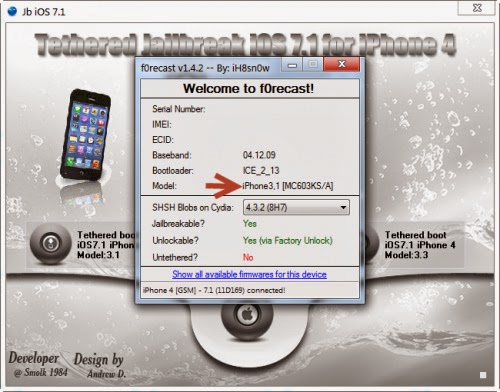
Step 7: Now press 'tethered boot iOS 7.1 iPhone 4 Model: 3.1 or 3.2 or 3.3' to boot the phone depending on your model; find the iPhone model with the image number in the window.
Jailbreak iOS 7.1 iPhone 4
Remove iOS 7 Activation
Step 8: After downloading, do not do anything before the device automatically reboots. Cydia will be installed.
Step 9: After that, you need to wait for respring. This is when mobilesubstrate will be added.
Step 10: Now feel free to open Cydia and install any updates.
Now upon every reboot, you need to connect iPhone to the computer and select 'tethered boot iOS 7.1', as it is not an untethered jailbreak'.

15 March 2014

iTools 1.8.3.5 Download here

iTools 1.8.3.5 Released For iTunes 11.1.5 iOS 7.1 Supported


Supported iTunes 11.1.5

iOS 8 release date, rumours & concept images - 'leaked screenshots' give first look new iOS 8 apps

iOS 8 release date, rumours & concept images - 'leaked screenshots' give first look new iOS 8 apps

Apple's iOS 8 is hot topic in among iPhone, iPad and iPod users right now. In this article, we bring you release date speculation, the latest rumours about iOS 8 and leaked images and mockups of the next version of Apple's mobile operating system. Read on to find out more.


Welcome to our iOS 8 release date, rumours and leaked images article. Here, we'll bring you everything we know about iOS 8, Apple's next iOS operating system for iPad, iPhone and iPod touch. This includes speculation about the iOS 8 release date, rumours about the new features that may arrive with iOS 8, and leaked images and mockups of iOS 8 as we see them. We'll update this article frequently, so check back regularly for the latest iOS 8 rumours.

Updated 13 March with new leaked iOS 8 app screenshots

The release of iOS 7 caused a buzz among the Apple community in 2013, as it came with a radical redesign, bringing a new look and feel to the iPhone, iPad and iPod touch software. Now that the excitement has died down a little, users are looking to the future, imagining what could be in store for the next version of iOS, presumably called iOS 8 if Apple's naming convention continues.

We're certainly excited about 2014 as a whole for Apple, not least because CEO Tim Cook has revealed on multiple occassions that the company has
"big plans" that it believes we are going to love.

Speculation about iOS 8 - which is believed to be codenamed "Okemo" after a ski resort in Vermont - skyrocketed as February 2014 arrived, with reports that Apple is working on a 'Healthbook' app for the new operating system, which could change mobile health and fitness tracking for good. Then, on 13 March, screenshots showing what is allegedly our first look at the app icons for Healthbook, Preview, TextEdit and Tips emerged.

Read on to find out more about the latest iOS 8 rumours and to see the leaked images.

iOS 8 rumours: Healthbook

In March, this image was leaked on Weibo and allegedly shows new Healthbook, Preview, TextEdit and Tips app icons, as spotted by 9To5Mac:


We assume that the Preview and TextEdit apps have the same functionality as their Mac counterparts, perhaps expanding iCloud compatibility. There's some confusion about what the Tips app is for though (presumably to provide tips... but what for?). Read on for more information about Healthbook.

Rumours have been circulating the web about a new health application that could arrive with iOS 8 and work with the widely anticipated iWatch, Apple's rumoured venture into wearable tech.

Apple plans to introduce a health and fitness tracking application with iOS 8 later this year, according to sources cited in a 9To5Mac report. This application is likely to work closely with Apple's rumoured iWatch, which the sources say is "well into development."

The sources claim that the iOS 8 app is codenamed 'Healthbook' and will be used to collect data such as how many steps you've taken, how many calories you've burned and the distance you've walked. The app will also allegedly be used to monitor blood pressure, hydration levels, heart rate and more. In addition to the monitoring and tracking features, the report claims Apple's Healthbook app will offer users the ability to set medication reminders.

The rumours of a Healthbook app arrive alongside reports that Apple executives have been meeting with medical officials including the Food and Drug Administration. Apple has also hired several people from the medical field. Most recently, Apple hired former chief medical officer at pulse oximeter firm Masimo Corporation Michael O'Reilly.

Perhaps the strongest evidence to support the theory that Apple is looking into introducing a health app is the M7 chip it introduced with its latest iPhone. The M7 chip measures motion data, enables the accelerometer, gyroscope and compass, and, as pointed out by Apple when the chip was announced, enables a new generation of health and fitness apps

iOS 8 rumours: New Touch ID features


During Apple's earnings call for the first quarter of 2014, CEO Tim Cook spoke about Apple's Touch ID fingerprint sensor, which was introduced in September 2013 with the iPhone 5s.

"The mobile payments area in general is one that we've been intrigued with - that was one of the thoughts behind Touch ID," he said. "But we're not limiting ourselves to that. I don't have anything specific to announce today, but you can tell by looking at the demographics of our customers and the amount of commerce that goes through iOS devices versus the competition that it's a big opportunity on the platform."

Cook's comments suggest that we should look out for new services that work with the Touch ID in future versions of iOS.

iOS 8 rumours: More new features

There are several additional new features that we'd like to see in iOS 8, and we've listed them (and the rumours surrounding them) in our iOS 8 wishlist below.

iOS 8 rumours: Notifications


One of the areas of iOS 7 that we expect to get addressed in iOS 8 is Notifications. We think that it feels a bit clumsy at the moment. For example, replying to an iMessage requires the launching of the app, rather than a simple dialogue box as in OS X's Notification Centre.

We'd like to see a universal control to clear all of the past notifications at once. In iOS 7, the user has to manually delete each app's entries.

We love Sam Beckett's interactive Notifications concept, as shown below. It's a perfect example of what we'd like to see in iOS 8 when it comes to the Notification Centre.


We'd also like to be able to quickly unsubscribe from app Notifications that we've accidently signed up to within the Notification Centre.

Apple made an interesting acquisition in 2013, for a small software house called Cue. Cue specialises in smart assistant programming. With Google Now becoming an increasingly impressive service on Android, it's possible that Cue could be how Apple will catch up. It could help Apple add smarter push notifications, providing us with the information we need when we need it.

iOS 8 rumours: Siri

We're sure that Apple will bring some new features to Siri, the voice-activated virtual assistant, with iOS 8. It looks like we'll be getting more voices within Siri in the UK. We currently only have access to a male voice, but the iOS 7.1 beta suggests we'll be getting a female voice for Siri, possibly even before iOS 8 comes out.

iOS 8 rumours: Control Centre


We loved the addition of Control Centre with iOS 7, and we think Apple could take it even further in iOS 8. Perhaps Apple will give users more control over the Control Centre, by letting them decide which apps they want easy access to.

iOS 8 rumours: Multiple accounts


A sought after iOS feature from Apple is the ability to add additional accounts to iPads and iPhones. For iPads that are shared among a family, this would allow each member to have their own private iOS account, particularly useful for parents with young children for better parental control.

iOS 8 rumours: Multitasking

Apple made some changes to Multitasking in iOS 7, but we'd like to see these changes go even further.

We particularly like Sam Beckett's Split Screen Multitasking concept. Split screen is something we'd love to see in iOS 8, as it would increase productivity significantly and is a feature we're constantly craving while using our iPad.


We'd also like to be able to close all of the open apps at once.

iOS 8 rumours: FaceTime


FaceTime hasn't seen much love from Apple in recent updates, apart from the addition of FaceTime Audio. We'd like to see Apple introduce the ability to call multiple people at once in FaceTime, for group calls. Skype already offers the ability to conduct group calls, so the addition of the feature for FaceTime would be a big plus for Apple users.

iOS 8 rumours: Default apps

We've been saying this for years, but we'd like to delete the annoying Apple default apps that we're not interested in or never use. It's unlikely that Apple will grant this wish, though.

iOS 8 rumours: Subscription service
An interesting idea shared with us by a colleague is the introduction of an iOS iTunes Store and/or App Store subscription service. The service could allow users to pay a set fee per month to get access to unlimited films, TV, books, apps and more (think Netflix or LoveFilm). We think this would be a brilliant idea that we could imagine many Apple users signing up to if it's priced right. It would be a huge **** for competitors, though.

iOS 8 rumours: Default third-party browser

Many of our colleagues use Apple Macs, but almost none of them use Safari as their default web browser; most favour Chrome or Firefox instead. So why does Safari maintain such a stranglehold on iOS? Because you still can't make a third-party browser the default. We'd love to see Apple add the ability to change the default browser to a third-party one in iOS 8.

iOS 8 rumours: Customised autocorrect

Since before iOS 7, we've been asking for the ability to turn off autocorrect on an app-by-app basis, to prevent those embarrassing errors that we so often see.

iOS 8 rumours: Battery life

Battery life issues plague iOS users. We asked our readers what they'd like to see in iOS 8, expecting whizzy features to be the most common answers, but it was battery life that took the top spot.

One of the ways Apple could help preserve battery life is to add a battery emergency feature to devices. How about a set of customisable actions set to kick in when your iOS device reaches 20 per cent power? Instead of just popping up with the warning, the device could be programmed to automatically lower the brightness, switch off 3G, Bluetooth and location services, and generally do everything in its power to stay alive.

iOS 8 rumours: iTunes Radio in the UK?

Since its release back in September 2013, UK Apple users have been waiting for iTunes Radio, a new service from Apple that allows you to stream any song available on iTunes. It's possible that we'll see iTunes Radio launch in the UK before iOS 8, though, with some rumours pointing to an early 2014 launch.

Find out more in our When will iTunes Radio come out in the UK article.

When will iOS 8 be released?

Apple has traditionally used its Worldwide Developers Conference to unveil new versions of iOS, so we expect that tradition to continue this year. WWDC is usually held in June, but we'll update you as soon as we find out specific dates for the conference.

There's even speculation that Apple may use this year's WWDC to unveil the iPhone 6.

While we expect iOS 8 to be shown off for the first time in June, it's unlikely to be released to the public until the next generation iPhone comes out, probably in September. Between June and September, iOS 8 is likely to be in beta form for developers to test and begin working on their apps ahead of the public release.

iOS 8 leaked images

There are no leaked images of iOS 8 yet, but as soon as we see them, we'll share them with you here. We'll also be keeping an eye out for convincing mockups that spark the imagination, such as the two concept videos shown earlier in this article.


Designer Nico Achkasov has come up with a concept he calls 'iOS 8 Infinity', in which he's redesigned the iOS icons to follow a grid system and specific colour palette. He created the new icons after many Apple users said they dislike the designs Apple has come up with for the icons.

Nico has taken away the gradients in many of Apple's icons and replaced them with the shine effect Apple recently ditched, though he's made sure to keep the icons 'flat'.
Related Posts Plugin for WordPress, Blogger...

New Post Here:


Copyright @ 2013 Rayerbazar Mobile.